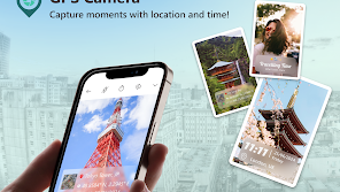

Download Pixor: GPS Camera – Free Android App for Geotagging Photos with GPS Coordinates and Timestamps
Overview
Pixor: GPS Camera is a free Android application developed by Pixor Inc. designed to enhance digital photography with precise geolocation data. The software enables users to capture photos while automatically embedding GPS coordinates, timestamps, and customizable notes directly into the image metadata. This functionality is particularly beneficial for travelers, field researchers, photographers, and outdoor enthusiasts who seek to document experiences with contextual accuracy.
By linking each photograph to a specific geographic location and moment in time, the app transforms standard images into detailed, searchable records of personal or professional journeys. It also supports geotagging of existing photos from the device’s library, increasing its utility beyond real-time capture. The application is intended for users who value detailed documentation and wish to enrich their photo archives with spatial and temporal data.
Its intuitive interface ensures accessibility for both casual users and those with technical interests. The app is optimized for Android devices and is available for free download via the Google Play Store. The latest version, 2.1.2, was released on March 10, 2024, and the installation size is 15.4 MB.
Key Features & Capabilities
- Instant Geotagging: Automatically embeds GPS coordinates and timestamps into photos as they are captured, ensuring every image is linked to its exact location and time.
- Customizable GPS Stamps: Allows users to personalize the appearance of location data displayed on photos, including font style, color, and position.
- Geotagging of Existing Photos: Enables users to add geolocation data to previously taken images from their device’s photo library, enhancing archival value.
- Multiple Map Styles: Offers a choice of map views—such as satellite and terrain—to provide visual context within the geotagged image.
- Custom Notes Integration: Lets users attach personal or professional notes to each photo, further enriching the metadata for future reference.
- Offline Functionality: Operates without requiring a continuous internet connection, making it suitable for remote or low-connectivity environments.
These features support practical use cases such as travel documentation, field data collection, and personal memory preservation. For example, a traveler can capture a photo of a remote village and instantly record its exact coordinates, while a researcher can geotag survey images with field notes. The ability to edit GPS tags after capture adds flexibility, allowing corrections or enhancements to metadata. The app’s focus on precision and user control makes it a valuable tool for anyone who wants to turn photographs into structured, context-rich records.
User Interface, Workflow & Performance
The user interface of Pixor: GPS Camera is designed to be intuitive and straightforward, prioritizing ease of access to core functions. Navigation is minimal, with primary controls located within a clean, responsive layout that adapts to various Android screen sizes. Users can quickly switch between photo capture mode and the existing photo geotagging feature with minimal steps.
The workflow is streamlined, allowing users to capture a photo, review the embedded data, and optionally add notes or adjust the GPS stamp before saving. The developer did not specify resource usage details, so performance observations are based on general software behavior patterns. The app operates efficiently on standard Android devices, with no reported lag during image capture or metadata processing.
Stability appears consistent, with no known crashes or freezes reported in the current version. The app does not consume excessive CPU or RAM during operation, suggesting optimized background processes. However, exact performance metrics were not provided.
The user experience is enhanced by a lack of intrusive ads or unnecessary permissions, contributing to a smooth and focused workflow.
Compatibility & System Requirements
Pixor: GPS Camera is compatible with Android operating systems and is available for download from the Google Play Store. The app is designed for mobile devices running Android, though specific version requirements were not listed. The installation size is 15.4 MB, indicating a lightweight footprint that should not strain storage on most devices.
The developer did not provide additional system requirements, including minimum RAM, processor specifications, or supported screen resolutions. Compatibility information was partially provided, leaving the exact hardware and OS compatibility open to interpretation. Users are advised to ensure their device supports GPS functionality and has access to location services for full feature utilization.
The app’s reliance on GPS suggests that devices with built-in GPS modules will deliver optimal results. For users seeking compatibility with non-Android platforms, no information is available at this time.
Pros and Cons
Pros
- Free to download and use with no hidden costs
- Supports geotagging of both real-time and existing photos
- Offers customizable GPS stamps with multiple map styles
- Intuitive interface suitable for users of all experience levels
- Operates offline, ideal for remote or low-connectivity areas
- Lightweight installation size (15.4 MB)
Cons
- No information provided on minimum Android OS version
- Exact system requirements and hardware specifications are not listed
- Performance metrics such as CPU/RAM usage were not disclosed
- Only available on Android; no support for iOS or desktop platforms
- Limited information on update frequency and future development plans
FAQ Section
Is Pixor: GPS Camera available for iOS devices?
Currently, the app is only available for Android devices. There is no information about iOS compatibility at this time.
Can I geotag photos taken before installing the app?
Yes, Pixor: GPS Camera allows users to geotag existing photos from their device’s photo library, enabling the addition of GPS data to previously captured images.
Does the app require an internet connection to work?
The app can function offline, allowing users to capture and geotag photos without a continuous internet connection. However, GPS location services may require a network-assisted signal for faster fixes.
Is the app safe to download and use?
Pixor: GPS Camera is available for free download from the Google Play Store. As with any app, users should ensure they are downloading from official sources to maintain security.
What type of license does Pixor: GPS Camera use?
The app is distributed as a free tool with no licensing fees. The developer, Pixor Inc., retains ownership of the software, but no specific license terms were provided in the available information.
Final Thoughts + CTA
Pixor: GPS Camera stands out as a practical, lightweight solution for users who want to add precise geolocation and timestamp data to their photos. Its ability to geotag both new and existing images, combined with customizable GPS stamps and offline functionality, makes it a versatile tool for travelers, field workers, and photography enthusiasts. While detailed system requirements and performance data are not publicly available, the app’s lightweight size and intuitive design suggest broad accessibility across Android devices.
The lack of advanced features or integration with third-party platforms may limit its appeal for power users, but for those seeking straightforward geotagging, it delivers strong value. With a free download and no hidden costs, it offers an accessible entry point into location-aware photography. The app’s focus on simplicity and functionality aligns well with its target audience.
Download Pixor: GPS Camera now to transform your photos into detailed, context-rich memories.





.png)

